 Go back


How do I access invoices in my account?
You can access your invoices at any time directly in your Goparity account.
To do so, you must access it and follow the steps below:
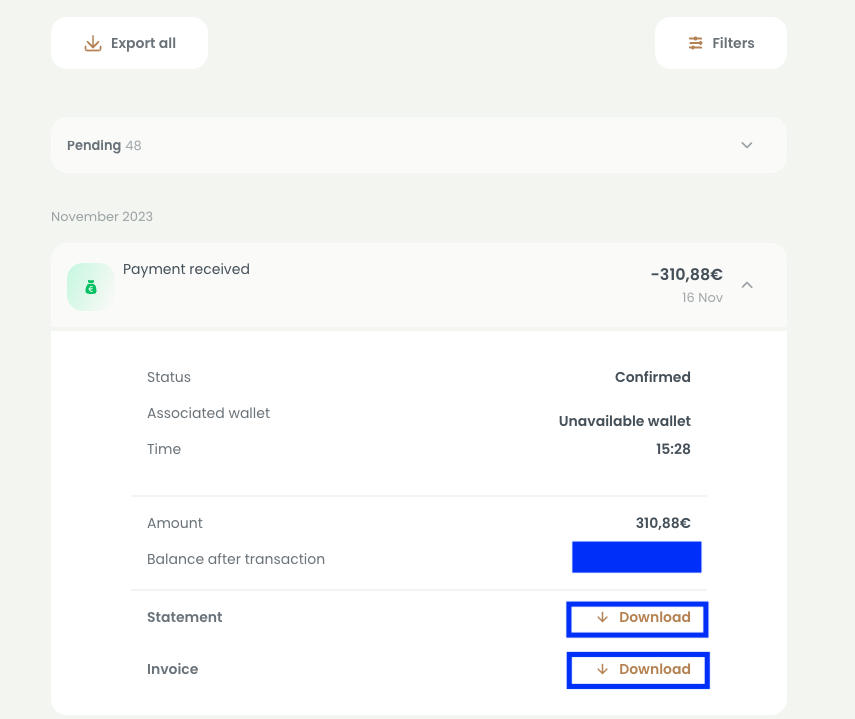
1. Go to the Dashboard;
2. Click on your project;
3. Go to the last activity section at the bottom of the page and select the view all option;
4. Click on the transaction and download the invoice or proof of payment for the transaction, as in the example below.
Most Frequently Asked:





4º Esq
1070-289 Lisboa
Portugal


© 2026 Goparity
GOPARITY (www.goparity.com) is a platform of crowdfunding by loans (crowdlending) managed and owned by Power Parity, SA, a public limited company, with number 514373822, and registered office at Rua Filipe Folque, 2, 1st floor, 1050-110 Lisbon (Portugal), licensed by the regulatory and supervisory body CMVM (Portuguese Securities Market Commission), under Regulation (EU) 2020/1503 (European Crowdfunding Regulation).
The payment services available through the platform are provided by MangoPay SA, a registered electronic money institution based in Luxembourg and supervised by the CSFF (Commission de Surveillance du Secteur Financier), registered with Banco Portugal (the Portuguese regulator) under no. 7830.
Investments in crowdlending carry a risk of a partial or total loss of the funds invested. The return on your investment depends on the project's success developed through the campaign in which you invest. Your investment is not covered by the deposit guarantee schemes established by Directive 2014/49/EU nor by the investor compensation schemes established by Directive 97/9/EU. Please consider all risks before investing and carefully read the Key Investment Information Sheet (KIIS) provided to you before investing.